
Administrative cost is not a side issue in healthcare. It is one of the clearest threats to margin, staffing stability, and cash flow. The American Hospital Association has reported that administrative functions account for more than 40% of hospital expenses, which is why automation belongs in financial strategy, not just IT planning.
Healthcare workflow automation matters because it changes where staff time goes and how reliably revenue gets captured. The right design removes repetitive work from intake, eligibility, prior authorization follow-up, claim preparation, and payment posting. It also creates cleaner data and a stronger audit trail, which becomes more important when a payer delays payment, denies a claim, or reimburses below contract or statutory expectations.
For specialty practices, hospitals, ASCs, imaging centers, and emergency groups, the biggest return does not come from faster front-desk work alone. It comes from connecting upstream revenue cycle steps to downstream enforcement. That means using automation to catch registration and coverage errors early, support cleaner claims, surface payer patterns across denials and underpayments, and preserve the documentation needed for Independent Dispute Resolution when a payment dispute cannot be resolved through standard appeals.
That is the difference between automation that saves labor and automation that protects revenue. Both matter. Revenue protection usually has the larger financial impact.
The End of Manual Work in Healthcare
A large share of healthcare work still depends on people retyping, checking, correcting, and chasing information across disconnected systems. In a specialty practice, that shows up in delayed registrations, late eligibility fixes, missing authorizations, avoidable claim edits, and underpayments that sit in A/R because no one has time to trace the root cause.
That operating model breaks down first at the margin. Staff burnout rises, exception queues grow, and revenue slips in small increments that rarely appear on a single dashboard. I see this most often in groups that believe manual effort equals control. It usually produces the opposite. The team works harder, but the practice gets less visibility into where cash is being lost and which payer behaviors need escalation.
Labor pressure makes the problem worse. So does payer complexity. Automation investment is rising across healthcare for a simple reason: organizations need a way to handle volume without adding headcount to every handoff. For specialty groups, the more important point is financial. The return is not limited to labor savings. It comes from protecting reimbursement before and after claim submission.
What manual work costs a specialty practice
Manual operations create three expensive patterns:
- Skilled staff spend time on repetitive tasks instead of resolving exceptions, supporting patients, and working high-value payer issues.
- Revenue problems begin earlier than leaders think because intake, eligibility, authorization, and documentation are still handled with inconsistent follow-through.
- Underpayments survive the payment cycle because the practice lacks a complete record of what was verified, submitted, corrected, appealed, and paid.
The third issue is where many automation projects fall short. A claim can move through the system and still pay incorrectly. If the workflow ends at claim submission, status checks, and posting, the practice may improve throughput while leaving payer underpayment untouched.
Revenue protection requires a longer chain of custody for information. The workflow has to preserve documentation, timestamps, payer responses, and claim history in a form the billing team can use for appeals and, when needed, downstream dispute enforcement. That is one reason many groups pair operational workflow redesign with medical billing automation for specialty practice revenue protection.
Practical rule: Automate routine steps first. Then automate the documentation and escalation path that proves the practice was entitled to payment.
Where healthcare workflow automation pays off
The strongest automation programs focus on failure points that create downstream financial exposure.
In practice, that means reducing manual work in intake, scheduling, eligibility verification, documentation routing, claim preparation, status follow-up, payment posting, and denial assignment. It also means connecting those steps so the practice can identify which payer is underpaying, which denial pattern keeps repeating, and which encounters need a dispute-ready file before the first appeal is sent.
That is the operational shift that matters. Healthcare workflow automation helps staff spend less time on clerical rework and more time on decisions that protect compliance, support care delivery, and recover revenue. For organizations dealing with persistent payer friction, that connection between upstream RCM discipline and downstream IDR readiness is where automation produces its strongest financial result.
Understanding the Core Automation Technologies
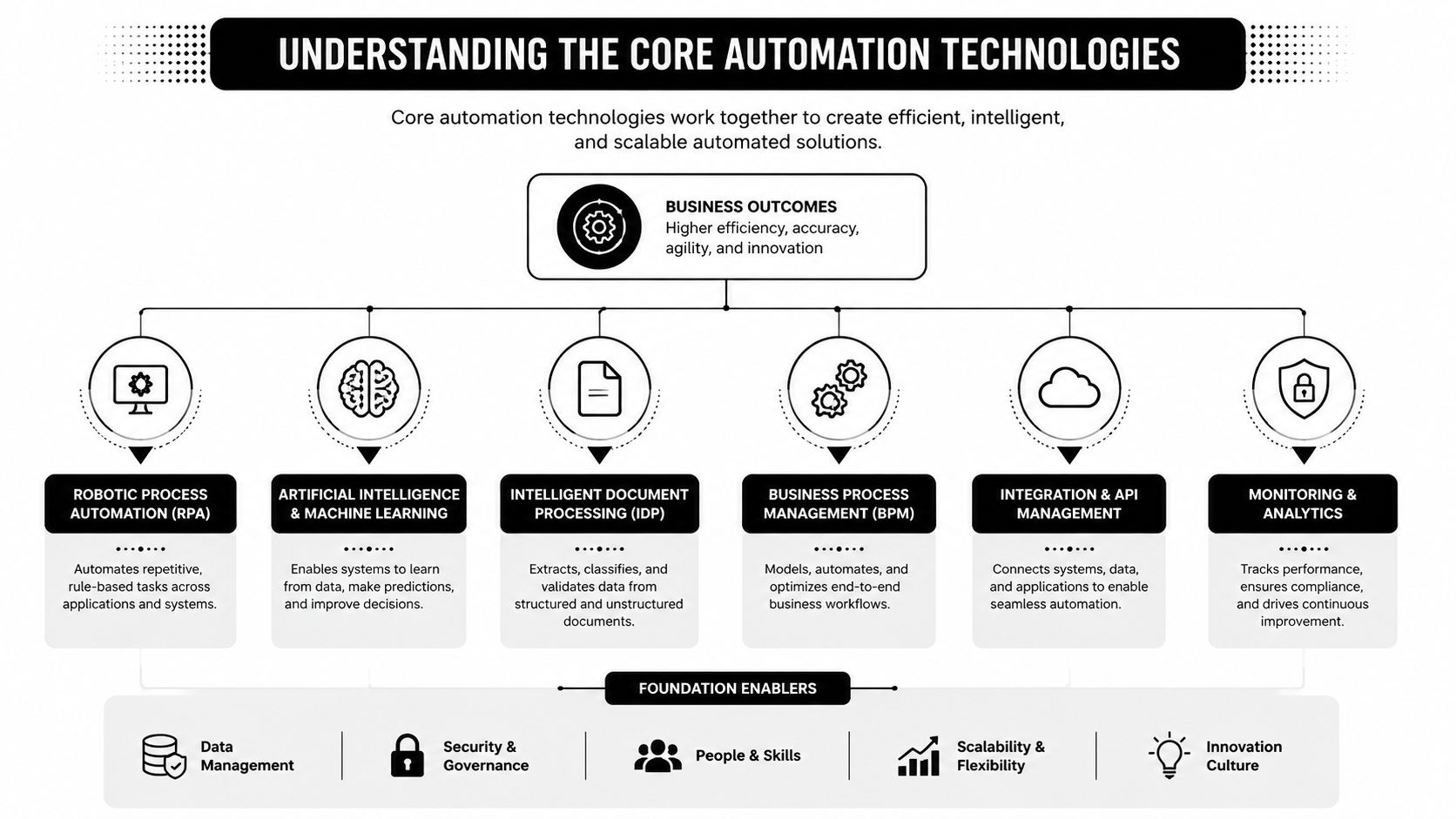
Most executives hear a flood of acronyms and tune out. The easier way to understand healthcare workflow automation is to think of your practice as a building that has to move people, information, and money without constant manual intervention.
BPM is the blueprint
Business Process Management, or BPM, defines how work is supposed to flow. It answers questions like who owns an eligibility exception, what happens when a claim fails edits, when a denial escalates to specialist review, and how documentation gaps get routed back to the clinical team.
Without BPM, organizations automate isolated tasks and call it transformation. In practice, they just create faster confusion.
RPA is the machinery
Robotic Process Automation, or RPA, handles the repetitive, rules-based actions inside that blueprint. Think claim status checks, payment posting steps, basic data transfer, remittance routing, or standard follow-up actions triggered by claim responses.
RPA works well when the task is structured and the rule is stable. It works poorly when the input is ambiguous, the exception rate is high, or the underlying issue requires financial judgment.
APIs and integration engines are the plumbing
This is the layer most buyers underestimate. A critical technical specification for healthcare workflow automation is a BPM suite integrated with advanced integration engines and APIs, which act as the digital plumbing connecting systems such as the EHR, LIS, and billing platforms without manual intervention (Curogram overview of healthcare workflow automation architecture).
If the plumbing is weak, staff still copy data between systems. They still reconcile mismatches manually. They still lose time when one workflow completes but the next system never receives the event.
When a new lab result arrives, a good integration layer doesn't just move the file. It triggers the next action, routes the task, and preserves an auditable trail.
Why leaders should care about the stack
Non-technical leaders don't need to master tooling. They do need to ask better questions. Is the vendor automating a task or redesigning the process? Can the system trigger work across scheduling, EHR, billing, and payer workflows? Can your team audit what happened and why?
For revenue-focused operations, this matters even more. A billing bot that clicks through portals may save time, but it won't fix fragmented claim logic or specialty-specific reimbursement workflows on its own. Teams evaluating medical billing automation for specialty practices should look for systems that connect process design, automation, and exception handling, not just speed up keyboard work.
Here's the practical summary:
| Technology | Best use | Common failure |
|---|---|---|
| BPM | Defining workflow rules, ownership, escalations | Automating chaos instead of redesigning process |
| RPA | Repetitive portal and data tasks | Breaking when payer rules or interfaces change |
| APIs and integration engines | Connecting EHR, billing, lab, and operational systems | Leaving teams with siloed automations and manual rework |
When these layers work together, healthcare workflow automation becomes operational infrastructure. When they don't, it becomes another dashboard sitting on top of broken handoffs.
Practical Automation Examples from Intake to Payment
The easiest way to judge automation is to follow the patient and the claim.
A patient books an appointment. Insurance is captured. Registration information lands in the chart. Clinical work happens. Charges are created. The claim goes out. The payer responds. Money posts. Exceptions move to follow-up. Every one of those moments can either create drag or preserve revenue.
Front-end workflows that reduce rework later
Hospitals using workflow automation for tasks like scheduling and billing report a 30% reduction in administrative workload, and automation in claims processing can cut processing times by up to 50%, contributing to a 20% to 30% reduction in operational costs (Feathery healthcare workflow automation statistics).
That starts at the front door.
Before automation, a front-desk team might collect demographics by phone, enter data manually, scan insurance cards, and run eligibility later if time allows. After automation, the patient completes digital intake before arrival, eligibility checks fire automatically, missing fields are flagged before the visit, and staff work exceptions instead of retyping basics.
A specialty group should especially care about that “exceptions instead of basics” shift. It's where staff become useful again.
Clinical support workflows that remove avoidable delays
Clinical automation doesn't have to mean advanced diagnostics. Some of the most valuable changes are simple and operational.
Examples include:
- Prior authorization routing that pulls the required clinical record set and sends incomplete requests back before submission.
- Lab and result routing that pushes the right information to the ordering team instead of relying on inbox luck.
- Ambient documentation tools that reduce note burden and improve chart completion speed.
- Staffing and room status triggers that keep throughput moving across sites of care.
In high-acuity or specialty settings, these workflows help because they reduce the non-clinical drag around clinical work. The provider still makes decisions. The system handles the choreography.
Revenue cycle workflows where money is usually won or lost
Revenue cycle automation is where most organizations expect value. Many still aim too low.
Basic wins include automated eligibility verification, claim scrubbing, status checks, ERA routing, and payment posting. For specialty practices, insurance eligibility verification workflows are one of the most impactful starting points because upstream mistakes often become downstream denials, patient balances, or appeal work.
The stronger play is linking those basics to specialty-specific financial risk. An anesthesia group, orthopedic practice, or air ambulance provider doesn't just need cleaner submission. It needs workflows that recognize likely underpayment patterns and preserve the documentation, coding logic, and case file structure required if the payer's reimbursement comes back short.
Here are examples worth prioritizing:
| Specialty | High-Impact Automation Workflow |
|---|---|
| Anesthesia | Eligibility, authorization tracking, clean claim checks, and underpayment flagging tied to payer response patterns |
| Orthopedics | Surgical episode intake, implant and documentation coordination, denial routing, and dispute-ready claim support |
| Air ambulance | Intake capture, medical necessity documentation flow, payer response analysis, and IDR evidence assembly support |
| Gastroenterology | Procedure scheduling, prep communication, coding support, and rapid claim exception routing |
| Dermatology | Prior authorization tracking, documentation capture for procedures, and patient balance communication |
| Imaging centers | Order intake validation, authorization checks, result routing, and payment variance detection |
The most useful automation isn't the workflow everyone can see. It's the workflow that prevents the claim from becoming a finance problem three weeks later.
That's the difference between labor savings and revenue protection.
Implementing Automation Without Disrupting Care
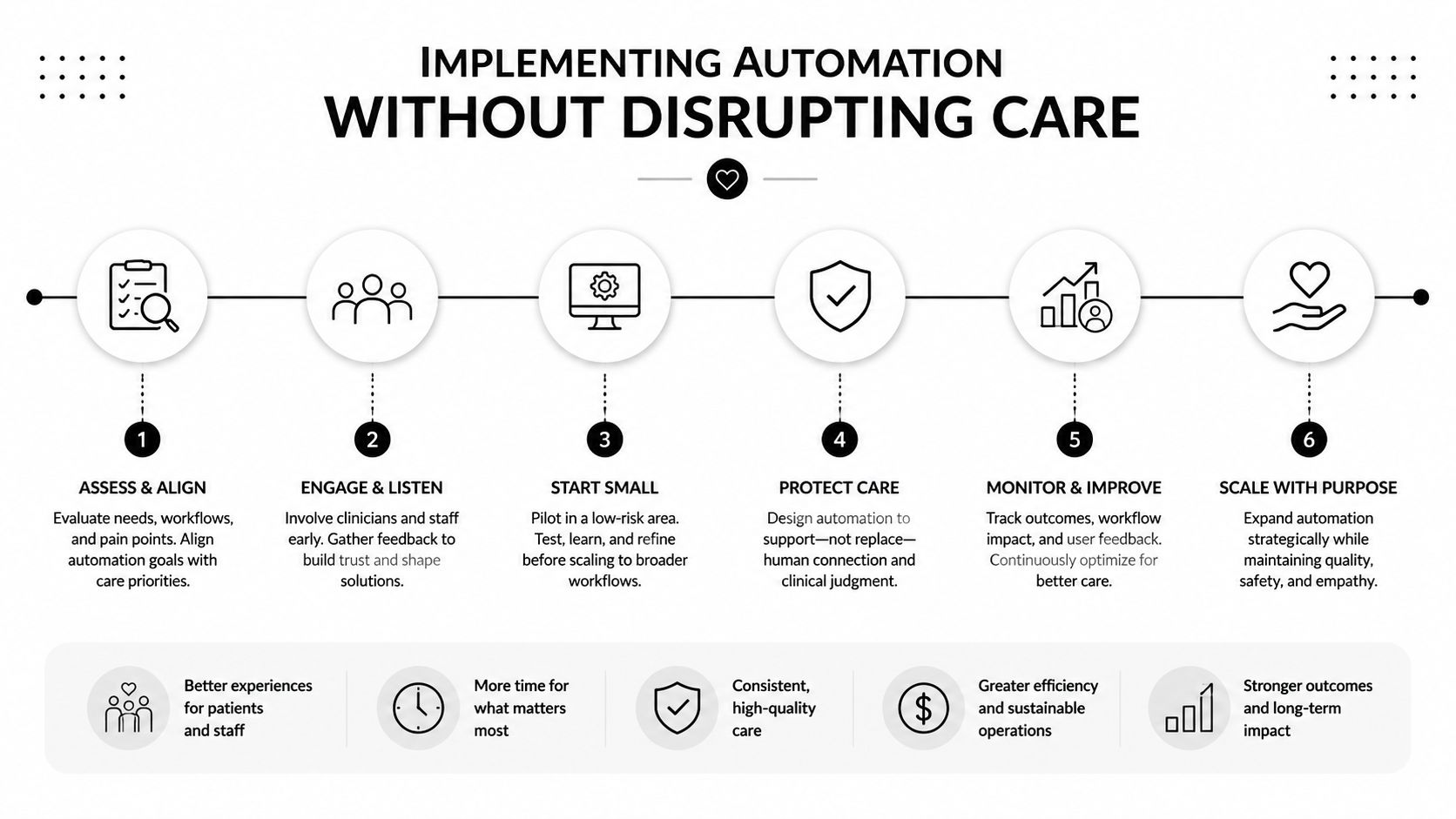
Most automation programs fail for boring reasons. The team chose the wrong process, skipped workflow mapping, bought a tool that doesn't integrate, or rolled it out without changing ownership rules. None of those failures are about innovation. They're execution problems.
Start where pain is acute
Don't automate the entire enterprise first. Start with one painful workflow that is repetitive, visible, and tied to a measurable outcome. Good starting points include eligibility verification, prior authorization intake, claim status work, denial routing, or payment posting.
When leaders start with an enterprise-wide vision and no operational pilot, staff hear “big project.” When they start with a concrete bottleneck, staff see relief.
Map the real workflow
Teams often document the policy version of a workflow, not the actual version. The actual version includes workarounds, portal checks, spreadsheet trackers, hallway approvals, and email chains.
Map both:
- Current state. Where does data enter, who touches it, where does it stall, and what gets reworked?
- Future state. Which steps should be automated, which should stay human, and who owns exceptions?
- Control points. What needs an audit trail, review rule, or compliance check?
Choose for integration and governance
A healthcare workflow automation vendor should fit your operating model, not just your demo script. Look at how it handles role-based access, exception routing, auditability, and system interoperability. In healthcare, a slick front end with weak integration usually creates hidden labor for the back office.
Operational advice: If your team still has to maintain shadow spreadsheets to know what happened, the automation layer isn't finished.
Pilot before scale
Run the first workflow in a controlled setting. One location, one specialty line, or one payer-facing process is enough. The goal isn't proving the concept of automation. That part is already obvious. The goal is proving that your design works inside your organization.
Watch for:
- Adoption friction among front-line users
- Exception volume that may require rule changes
- Data integrity problems between systems
- Escalation gaps when the workflow encounters a non-standard case
Treat change management as part of the build
Automation changes jobs even when it doesn't eliminate roles. Front-desk staff stop typing and start resolving intake exceptions. Billers spend less time checking status and more time managing denial categories. Managers shift from anecdotal oversight to dashboard-based review.
That transition needs clear communication. Staff should know what's changing, why it matters, and how success will be measured. The organizations that do this well don't present automation as a labor threat. They present it as a way to remove clerical burden and strengthen operational control.
Avoiding Common Pitfalls and Ensuring Compliance
A lot of healthcare workflow automation content makes the same assumption. Automate the simple stuff, and the hard stuff will improve on its own. That's often false.
Simple-task automation can absolutely reduce administrative burden. But in many specialty practices, the largest financial exposure sits inside workflows that are complex, exception-heavy, and impossible to solve with a few bots and a rules engine.

The first mistake is automating a bad process
If a workflow has unclear ownership, inconsistent documentation requirements, or weak payer rules logic, automation will only speed up the damage. Claims may go out faster, but they'll still be wrong. Denials will arrive sooner. Staff will then spend their time cleaning up automated mistakes.
That's why practices should avoid “task-first” buying. Start with a process that is worth standardizing. Then automate the pieces that benefit from consistency and scale.
The second mistake is treating interoperability as optional
Healthcare operations break at the seams. Scheduling doesn't match registration. The EHR doesn't pass the right data to billing. The billing team can't easily connect adjudication outcomes back to front-end failures. When those systems don't talk cleanly, compliance risk rises because staff create manual workarounds.
That affects privacy, too. Automated environments still need access controls, audit logs, defined user roles, and disciplined exception handling. A chaotic workflow with automation layered on top is still chaotic. It's just harder to inspect.
The biggest mistake is stopping at claim submission
In these situations, generic automation guidance usually falls short.
Industry research confirms that workflows requiring humans in the loop because of high complexity are frequently left unautomated, even though they represent the largest source of financial risk. Only 15% of organizations using AI in revenue cycles report positive ROI, suggesting current tools fail in complex, high-value denial management where RCM and IDR must be structurally linked (PMC research on healthcare workflow complexity and revenue-cycle automation limits).
That finding should make specialty groups pause. If the automation stack handles charge capture, submission, and payment posting, but not denial intelligence, underpayment pattern recognition, or dispute-ready case assembly, the practice may be optimizing low-value work while leaving high-value reimbursement exposed.
What revenue-protective automation should do instead
In high-stakes specialties, an intelligent workflow should:
- Flag suspicious payer behavior when reimbursement patterns diverge from expected logic
- Preserve the upstream evidence trail from eligibility, documentation, coding, and authorization events
- Route high-risk underpayments to specialized review instead of generic denial queues
- Support NSA-compliant dispute preparation when an out-of-network or underpaid claim needs IDR escalation
A platform such as RevGuard functions as one option in the market. Its model links specialty-specific RCM workflows with IDR enforcement so claims are engineered to be clean and dispute-ready, rather than treating arbitration as a disconnected downstream task.
A payer denial isn't always an error. In some specialties, it's a reimbursement strategy. Your workflow should be designed accordingly.
Healthcare workflow automation only becomes financially mature when it protects reimbursement after adjudication, not just before it.
Measuring What Matters KPIs and True ROI
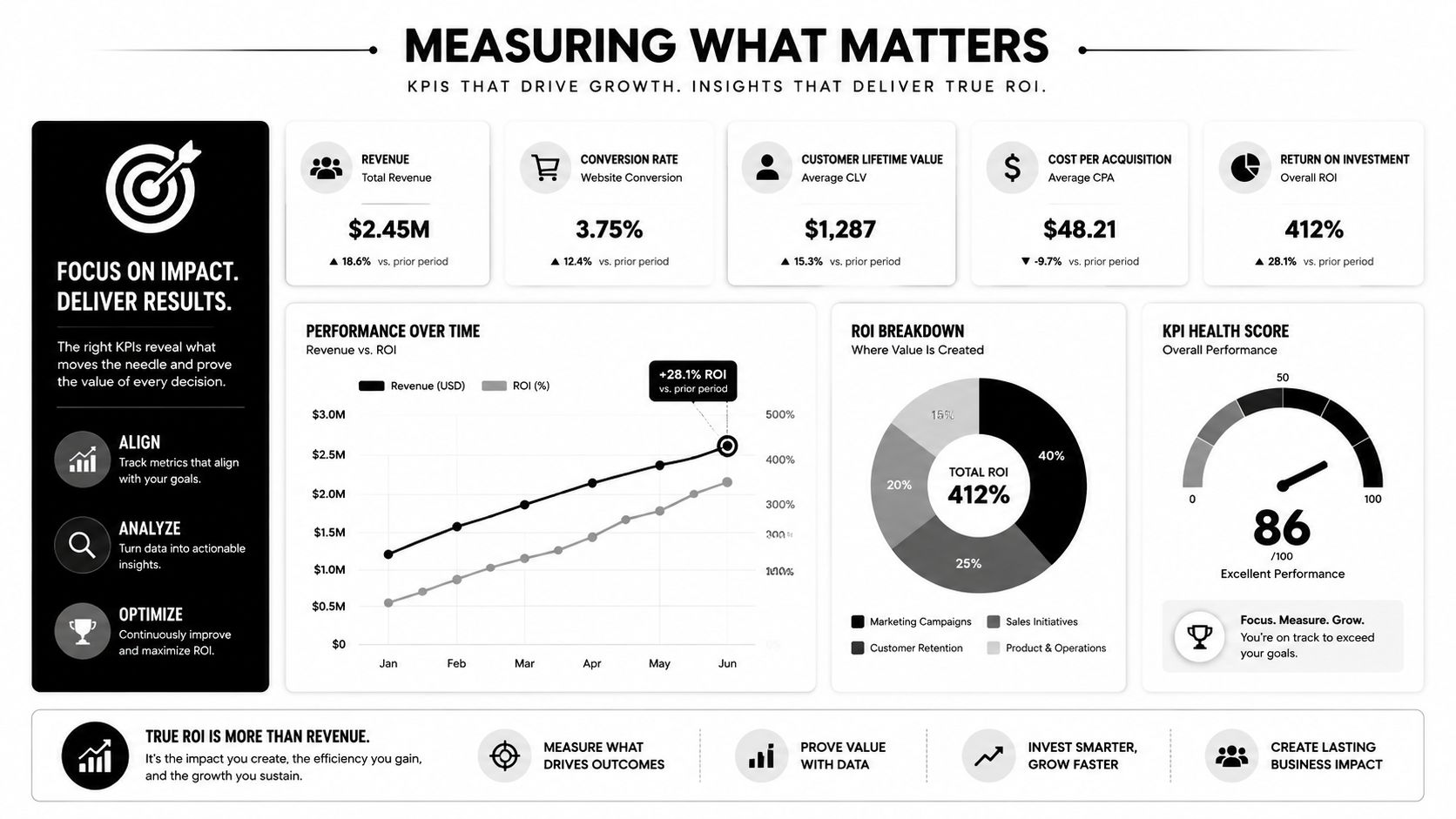
Most automation ROI conversations are too shallow. They focus on hours saved, staff redeployed, or cycle time reduced. Those metrics matter, but they don't tell a specialty practice whether automation is protecting net revenue.
Three ROI lenses that matter
A more useful framework breaks ROI into three buckets.
Cost savings
This is the most familiar category. You're looking at reduced manual touchpoints, fewer errors, and lower rework volume. If staff no longer spend hours on claim status checks, repetitive posting work, or intake corrections, operating cost improves.
Cash acceleration
This category tracks how quickly work moves from encounter to payment. Faster chart completion, cleaner submission, quicker exception routing, and fewer stalled claims improve cash flow velocity. For practices carrying payroll, supply costs, and debt obligations, timing matters almost as much as total reimbursement.
Revenue recovery
This is the category most generic guides ignore. Revenue recovery asks a harder question. How much underpaid or disputed revenue did the workflow help preserve, defend, or recover?
That's especially important in specialties where payer underpayments are patterned rather than random.
The KPIs that show whether the system is working
Most guides cite generic metrics, but a key question they fail to answer is how to measure the ROI of workflow automation in dispute resolution. The most important metrics are often backend adoption rates and error reductions, not just speed, allowing practices to calculate the recovery value of IDR-driven arbitrations (HealthTech analysis on clinical workflow automation and dispute-resolution ROI).
Use KPIs in layers:
| KPI layer | What to watch |
|---|---|
| Operational | Clean claim performance, denial categories, exception queue aging, workflow adoption by team |
| Financial | Cost to collect, cash posting speed, underpayment variance visibility, reimbursement leakage trends |
| Strategic | Payer behavior patterns, dispute readiness, recovery value from escalated claims, negotiating leverage from data |
A practice that wants a more disciplined view of revenue cycle optimization in complex specialties should build dashboards that connect workflow events to financial outcomes. If an automation project improves submission speed but doesn't reduce preventable denials or strengthen underpayment recovery, its ROI may be overstated.
The test is simple. Don't just ask whether the workflow runs faster. Ask whether it changes what gets paid, what gets recovered, and what the practice now knows about payer behavior that it didn't know before.
Your Next Steps in Workflow Automation
Healthcare workflow automation works when leaders buy it for the right reason. The right reason isn't novelty. It's control. Control over labor, over errors, over handoffs, over compliance, and over reimbursement.
For most organizations, the next step isn't “digitize everything.” It's to evaluate automation through a tighter operating lens. Can this workflow reduce manual work without obscuring accountability? Can it connect front-end intake to back-end revenue action? Can it support exception handling in specialties where complexity is the rule, not the edge case?
Questions worth asking every vendor
Bring these questions into every evaluation:
- How does your system handle specialty-specific workflows in coding, billing, and payer follow-up?
- What happens when the process hits an exception and a human needs to step in?
- How do your integrations work across EHR, billing, lab, and payer-facing systems?
- What audit trail exists for compliance review and operational troubleshooting?
- Can the workflow preserve documentation and decision logic needed for appeals or disputes later?
- How does the platform support revenue protection after claim submission, not just before it?
What good looks like
A credible automation partner won't talk only about speed. They'll talk about governance, interoperability, exception design, and measurable financial outcomes. They'll understand that a dermatology group, an orthopedic platform, and an air ambulance provider do not share the same payer risk profile. They'll also understand that some of the most valuable workflows are the least glamorous.
The mature automation question isn't “what can we automate?” It's “what should be automated so our people can focus on judgment, and our systems can defend revenue?”
That's the standard to use. If a solution can reduce clerical burden, strengthen clean claim performance, and support downstream revenue enforcement when payers underpay, it's worth serious consideration. If it only speeds up isolated tasks, it may still help, but it won't solve the core problem.
RevGuard helps specialty practices, hospitals, ASCs, and multi-site provider groups connect automation with revenue protection. If you're evaluating workflows that need to do more than reduce admin time, especially in areas where clean claim engineering, denial management, and IDR enforcement need to work together, learn more at RevGuard.