

Monday starts with a stack of eligibility issues from Friday, a payer portal that timed out halfway through claim status checks, and a coder asking whether the op note supports the modifier the surgeon documented. By noon, someone finds three claims that never made it out because a demographic field was off by one character. By late afternoon, the denial queue is growing faster than the payment batch.
That's a normal week in a lot of specialty practices.
Manual billing doesn't usually fail in dramatic ways. It leaks revenue in small, repeatable ways. A missed authorization note. A stale payer rule. A denial letter sitting in a shared inbox because nobody had time to read it line by line. For anesthesia, orthopedics, GI, dermatology, radiology, and other specialty groups, those leaks add up fast because claims are more nuanced, documentation is heavier, and payer edits are less forgiving.
Medical billing automation matters because it changes the operating model. Instead of relying on staff to catch every issue after the fact, the practice builds controls into the workflow before a claim leaves the door. That shift is why the market is projected to grow from USD 22.48 billion in 2026 to USD 63.19 billion by 2035, at a 12.17% CAGR, according to Towards Healthcare's medical billing market analysis. The practices moving first aren't just chasing efficiency. They're protecting margin, reducing avoidable denials, and creating cleaner records when payers push back.
Moving Beyond Manual Billing Chaos
The pattern is familiar. Your front desk verifies coverage one way. Your billers check it another way. Your coders work from the chart that was available at the time, then a later note changes the picture. Payment posting lags, denials come back in batches, and nobody feels fully confident that the aging report reflects what's recoverable.
In specialty care, the chaos gets worse because reimbursement risk starts upstream. A claim isn't weak only when it gets denied. It's weak when the registration record is incomplete, when documentation doesn't fully support the service line, or when the payer-specific edit wasn't applied before submission. By the time the denial arrives, the revenue damage has already happened.
Where the leakage really happens
Most practice managers don't need a definition of medical billing automation. They need relief from recurring loss points like these:
- Front-end mismatches: eligibility isn't confirmed in a way that aligns with the payer's current requirements
- Coding drift: documentation and billed services don't line up cleanly enough to survive payer scrutiny
- Submission defects: claims pass an internal review but fail payer-specific edits
- Slow denial handling: staff spend time finding the reason before they can even start fixing it
- Weak dispute files: when underpayments or NSA-related disputes arise, the supporting record isn't organized for defense
Manual billing often creates a false sense of control. Staff are busy, but the process is still reactive.
That's why many groups are tying automation directly to broader revenue cycle optimization strategies, not treating it as a back-office software upgrade. The gain isn't just fewer clicks. It's better control over how claims are built, validated, tracked, and defended.
Why specialty practices feel this first
A primary care claim may be straightforward. A specialty claim often isn't. Multiple modifiers, procedure documentation, medical necessity support, authorization details, site-of-service issues, and payer carve-outs all create room for revenue leakage.
When that complexity sits on top of manual workflows, cash flow gets uneven and staff burn out. Medical billing automation gives the practice a way to standardize judgment where rules are clear, flag exceptions where judgment is required, and preserve staff time for the claims that need expertise.
What Medical Billing Automation Really Means
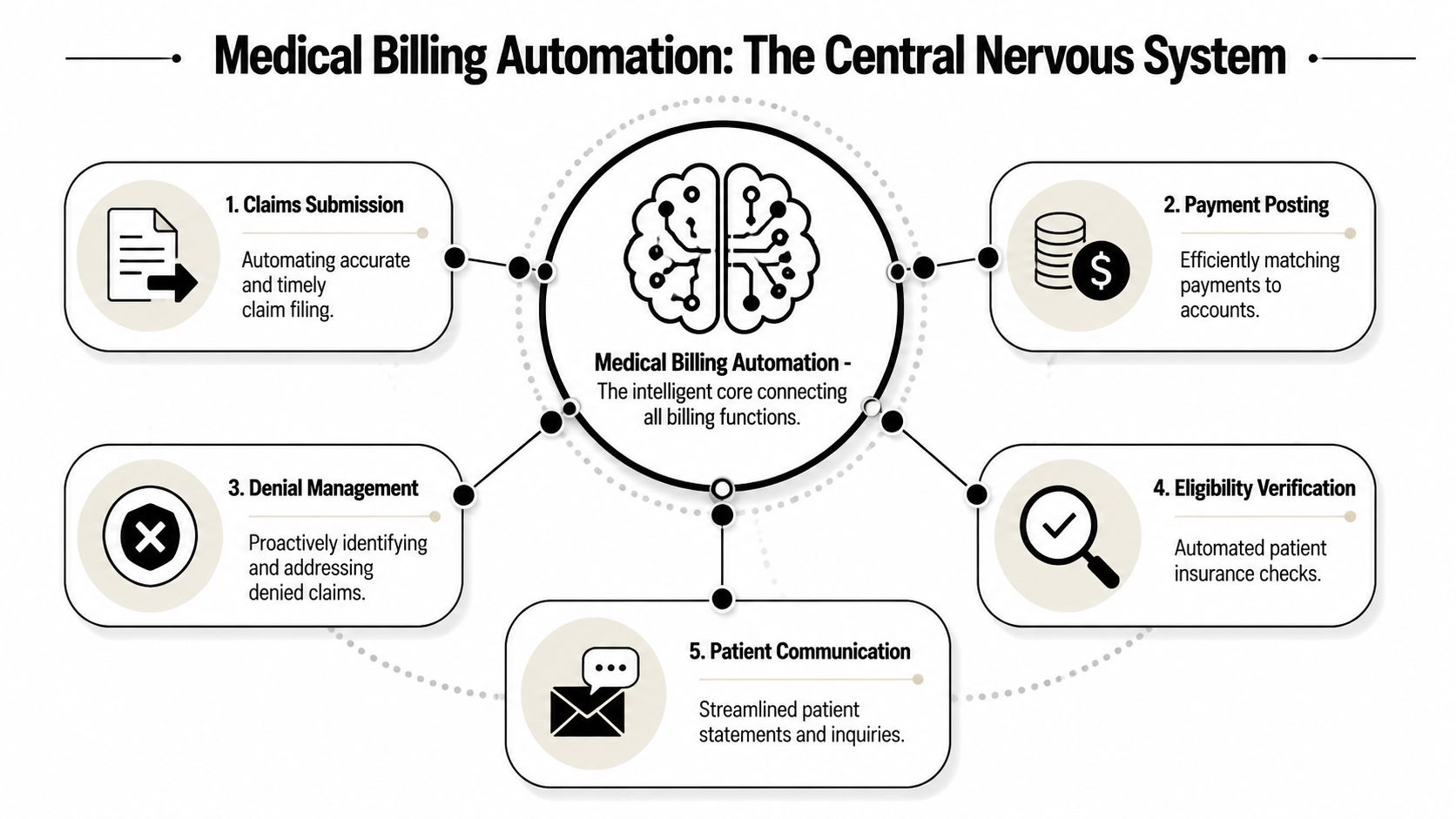
Medical billing automation isn't just electronic claims submission. That's the baseline. Real automation acts more like the practice's financial nervous system, receiving inputs from registration, documentation, coding, payer rules, remittance data, and denial correspondence, then pushing actions to the right place without waiting for a person to notice every issue.
What it is
An automated billing environment connects core revenue tasks so the workflow keeps moving with less manual intervention. In practice, that means the system can pull patient and insurance data forward, apply payer edits before submission, route denials by reason type, reconcile payments, and prompt staff only when an exception needs review.
A strong setup usually includes:
- Eligibility automation: checks coverage and benefits before or near time of service
- Coding support: helps align documentation with the billed service
- Claim scrubbing: validates data against payer-specific logic before submission
- Payment automation: matches remits and posts payments with less hand-keying
- Denial routing: classifies issues and sends them to the right queue fast
- Patient communication workflows: supports statements, balance follow-up, and billing inquiries
What it isn't
It isn't a magic switch that removes human judgment.
It also isn't just a clearinghouse connection, a rules table, or a claims dashboard. Those can be useful pieces, but they don't create an automated revenue cycle by themselves. If your team still has to re-enter data, manually interpret every denial letter, or run work queues from spreadsheets, you have partial digitization, not full automation.
The best billing automation doesn't replace expertise. It preserves expert time for the claims, denials, and disputes that actually need human judgment.
Why the distinction matters
Specialty practices often buy a tool expecting transformation, then discover they only purchased speed in one step of the process. That's not enough. Faster claim submission doesn't help if the claims are still structurally weak. Better dashboards don't help if nobody fixed the intake or coding workflow that feeds them.
The more useful way to think about medical billing automation is as an integrated control layer. It coordinates what should happen automatically, what should be flagged, and what should be escalated. That's how it protects revenue, not just administrative time.
The Core Components of an Automated Billing Engine
If automation is the operating model, three technologies do most of the work underneath it. They don't solve the same problem, and practices get better results when they assign each one a clear job.
RPA handles repetitive execution
RPA uses software bots to complete repetitive, rules-based billing work such as claim status checks, payment posting steps, invoicing actions, and other back-office tasks.
According to Medwave's review of medical billing software trends, 81% of surveyed healthcare practices now use cloud-based billing systems that integrate RPA, and those systems also use NLP to read written denial reasons from payers.
In practical terms, RPA is what saves staff from logging into multiple systems to do the same low-value action over and over. In a specialty practice, that might mean moving registration data into the billing workflow, checking claim status at intervals, or reconciling standard payment events.
RPA works best when the process is stable and rules-based. It works poorly when the underlying workflow is inconsistent. If every payer follow-up requires a different undocumented workaround, the bot won't fix the process. It will only automate the mess.
AI and machine learning improve decision quality
AI and machine learning identify patterns in billing data, flag likely defects, support coding decisions, and help the practice intervene before a claim becomes a denial.
This layer matters when the task isn't just repetitive. It requires pattern recognition. Think of a payer that tends to deny a certain procedure combination when documentation language is incomplete, or a specialty service line where coding errors usually cluster around the same modifier logic. AI can surface those risks before submission, which is where revenue protection starts.
For specialty groups, this is often the difference between automation that merely moves claims and automation that improves claim quality.
If you want a useful benchmark for system design, start with your clearinghouse workflow in medical billing. That's where payer edits, submission logic, rejection visibility, and exception routing either support automation or undermine it.
NLP turns unstructured text into action
NLP reads free-text content such as denial letters, payer comments, and clinical notes, then extracts usable meaning for billing workflows.
This is one of the most practical capabilities in modern medical billing automation because so much payer communication still arrives in messy formats. A denial may come back as text in a portal note, a PDF letter, or a remark that isn't neatly coded for workflow rules. NLP helps the system interpret that text and route the claim appropriately.
For example, if a payer denies a pain management claim with a narrative explanation tied to documentation sufficiency, NLP can identify the reason category and send it to the right work queue instead of forcing staff to sort every item manually.
What actually works in the field
The strongest setups combine all three:
- RPA for repeatable execution
- AI for risk detection and claim-quality decisions
- NLP for interpreting messy payer or clinical text
What doesn't work is buying a platform with those labels and assuming the job is done. The technology only performs when payer logic, workflow ownership, and exception handling are designed correctly.
How Automation Transforms RCM Workflows
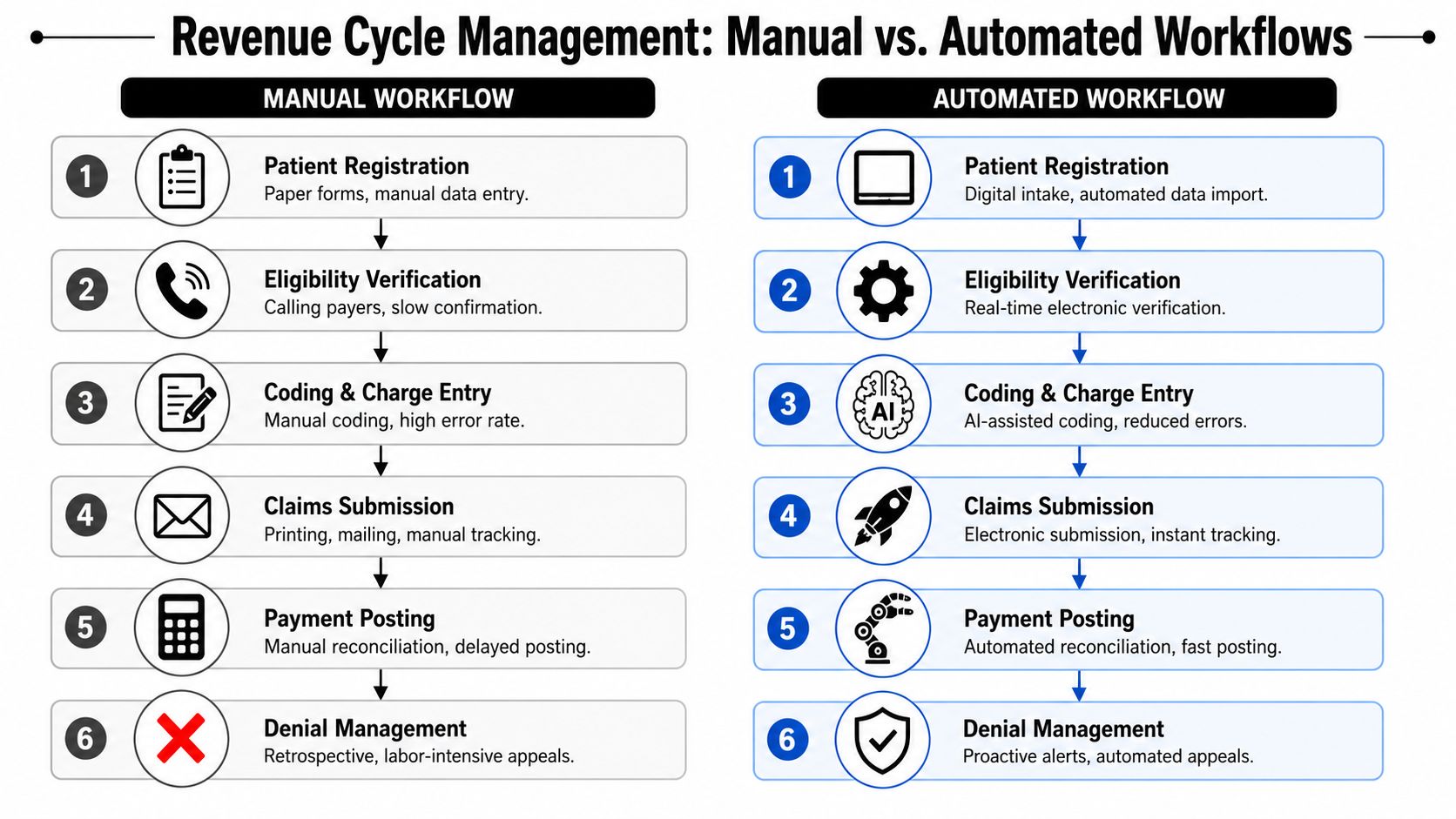
The easiest way to judge medical billing automation is to compare the daily workflow before and after implementation. Not in theory. In the actual handoffs that shape whether a claim gets paid, delayed, or denied.
Front-end work changes first
In a manual environment, staff collect demographics, copy insurance data, and verify benefits through payer sites, phone calls, or fragmented portal checks. Even when people are careful, the process leaves room for inconsistent verification and missed plan details.
In an automated environment, eligibility and benefits checks happen electronically and close to the point of service. The system can flag missing coverage details, mismatches in subscriber data, or conditions that require another review before the encounter moves downstream.
That one shift matters because many denials are born at intake.
Mid-cycle quality control becomes proactive
Manual coding and charge entry often depend on a sequence of human reviews. Someone reads the note, someone else enters the code, another person catches an issue if they're lucky, and the claim goes out after scrubbing that may or may not reflect current payer logic.
Automation changes that flow in a few important ways:
- Documentation review gets faster: systems can compare chart content to billed services and highlight mismatches
- Charge capture gets cleaner: missing or inconsistent fields are flagged before submission
- Payer edits happen earlier: claims are scrubbed against current payer logic before they become rejections
- Exceptions are isolated: staff work the difficult claims instead of touching every claim
Cleaner claims aren't just faster claims. They're easier to defend when payment disputes move beyond routine follow-up.
Back-end follow-up stops being purely reactive
Once the claim is out, manual teams spend a huge amount of time asking basic operational questions. Was it received? Was it rejected? Was it denied? Why? Who owns the next step? Those questions consume labor that should be focused on recovery.
Automated workflows create a tighter loop:
| Workflow stage | Manual reality | Automated workflow |
|---|---|---|
| Eligibility | Checked inconsistently | Verified electronically and flagged early |
| Coding | Reviewed claim by claim | Assisted by system logic with exception routing |
| Submission | Sent after manual review | Scrubbed and tracked electronically |
| Payment posting | Reconciled by hand | Matched and posted with system support |
| Denials | Read and sorted manually | Routed by reason and priority |
For specialty practices, this also improves downstream dispute readiness. When documentation alignment, payer edits, submission records, and denial data are captured systematically, the billing record becomes more usable if you need to challenge an underpayment or prepare for arbitration under the No Surprises Act.
Calculating the ROI of Automation for Your Practice
Practice leaders usually ask the right question: what changes financially if we automate, and how fast will we see it?
The answer shouldn't start with software features. It should start with labor hours, denial prevention, coding quality, payment speed, and how much staff time is being spent on work that a system could handle more consistently.
According to Enter Health's analysis of AI in medical billing, AI-driven medical billing automation achieves a 96% coding accuracy rate, reduces processing time by 8 minutes per claim, and can cut operational costs by up to 80% in billing time. For a specialty practice, those improvements don't just affect productivity. They influence clean-claim performance, rework volume, and how quickly cash becomes collectible.
A practical ROI framework
Use four buckets when you evaluate return:
Labor recovery
Calculate how many staff hours are currently spent on repeated entry, status checks, remittance posting, and first-pass denial sorting.Rework reduction
Measure how many claims require correction after submission because of eligibility errors, coding mismatches, or missing claim elements.Acceleration of payment
Look at where preventable delays occur. Faster clean claims and cleaner posting usually improve cash timing even when payer behavior doesn't improve.Revenue protection
Count the claims that aren't just delayed, but weakened by bad documentation linkage or poor audit trails. This is the hidden ROI category most practices miss.
Manual versus automated performance
| Metric | Manual Process Benchmark | Automated Process Target |
|---|---|---|
| Coding accuracy | More dependent on manual review and rework | Higher consistency with AI-assisted coding support |
| Time per claim | Slower because staff must review, correct, and resubmit manually | Lower touch time with automated checks and routing |
| Billing labor use | Heavy administrative load | More staff time shifted to exceptions and appeals |
| Claim quality | Variable by staff capacity and payer complexity | More standardized before submission |
| Dispute readiness | Often assembled after a payment problem occurs | Better supported through cleaner claim records |
Where ROI discussions go wrong
Some groups only count headcount savings. That's too narrow.
The more durable ROI comes from reduced leakage. If automation helps your team send cleaner claims, catch defects earlier, and preserve stronger documentation trails, the financial impact shows up in fewer denials, less avoidable rework, and a greater advantage when a payer underpays. That's especially important for high-acuity or out-of-network-sensitive specialties where the downstream payment fight can be as important as the original submission.
Implementation and Mitigating Compliance Risks
A weak implementation creates new problems. An effective one builds a more controlled revenue cycle and a stronger compliance position at the same time.

Automation should be rolled out around revenue risk, not around whichever task seems easiest to automate first. In specialty billing, that means starting where bad data, payer complexity, and documentation gaps are most likely to create denials or weak claims.
Build the workflow before you buy the tool
A practical implementation sequence looks like this:
- Audit the claim path: map how a claim moves from scheduling through final payment, then identify where defects first enter
- Separate rules from judgment: automate repeatable payer logic, but keep complex coding review and appeal strategy with trained staff
- Define exception ownership: every flagged claim needs a clear queue, turnaround expectation, and accountable role
- Test integration points: EHR, PM system, clearinghouse, remittance feeds, and denial intake all need clean handoffs
- Train for oversight: staff should know how to audit automation output, not just how to click through it
Why compliance belongs in the same conversation
Under the No Surprises Act, billing operations and dispute strategy are connected. If a payer underpays or a payment dispute advances into IDR, the practice needs a claim file that is accurate, consistent, and well-supported. That doesn't happen at the arbitration stage. It starts at registration, coding, submission, and payment tracking.
According to CombineHealth's overview of automated medical billing software, automated claim submission systems can reduce denial rates to 6% and decrease claim rejection rates by 30–40% by identifying high-risk claims before submission and applying payer-specific edits. Those same upstream controls also help create cleaner records when the practice must defend its reimbursement position.
A dispute-ready claim typically has these traits:
- Verified patient and coverage data
- Documentation that supports the billed service
- Payer-specific edit checks applied before submission
- Clear submission and follow-up history
- Structured denial and underpayment tracking
That's one reason some practices evaluate automation vendors partly on compliance design, not just workflow speed. Options in the market vary widely. Some focus on task automation alone. Others tie automation to payer-specific logic, analytics, and dispute support. Firms such as RevGuard's medical billing compliance services connect specialty RCM workflows with NSA-aligned dispute preparation, which matters for practices that need both denial prevention and downstream IDR support.
If your automation stack can't help produce a defensible claim record, it's solving only half the revenue problem.
What to watch closely during rollout
The most common failure points are over-automation of judgment calls, weak payer rule maintenance, and poor exception management. Automation should reduce manual noise. It shouldn't hide bad inputs or make staff trust flawed outputs.
HIPAA, payer policies, and NSA-related requirements all demand traceability. The implementation should make the workflow easier to audit, not harder.
The Future of Revenue Protection Is Automated
Specialty practices don't have the luxury of treating billing as an isolated administrative function anymore. Payer scrutiny is tighter, reimbursement pressure is constant, and payment disputes don't stay confined to the back office. Revenue protection now depends on how well the practice builds the claim before it ever reaches a payer.
That's why medical billing automation belongs in the same strategic conversation as denial prevention, underpayment recovery, and No Surprises Act readiness. The value isn't limited to faster work. The value is structural. Better intake controls, cleaner coding support, stronger payer-rule enforcement, and organized claim data all make revenue more recoverable.
The practices that benefit most won't be the ones that automate everything blindly. They'll be the ones that automate repeatable tasks, preserve human judgment for exceptions, and design workflows around claim defensibility. In that model, automation becomes the system that supports both cash flow and compliance.
For practice managers, the next step is straightforward. Audit where your claims weaken today. Find the points where staff are re-keying data, interpreting the same denial patterns repeatedly, or building dispute files after the damage is done. Those are the pressure points where automation should enter first.
A modern billing operation doesn't just submit claims. It engineers claims that are cleaner, more compliant, and easier to defend.
If your practice needs a tighter link between specialty RCM operations and downstream payment enforcement, RevGuard works on both sides of the problem. The firm supports eligibility, coding, billing, payer follow-up, and collections, then connects that work to No Surprises Act IDR workflows when payers delay, downcode, or underpay.