

You're probably living the same mess right now, a new provider has been hired, the welcome email went out, the roster looks “done,” and then weeks later claims start stalling because enrollment never caught up with credentialing. That's not an admin hiccup. That's cash sitting outside your control, and in specialty care, it turns into a silent revenue leak fast.
Provider credentialing software only looks like paperwork automation from the outside. In practice, it's a control point for revenue protection, payer readiness, and dispute readiness when underpayments need to be fought later. If your group cares about speed, fine. But speed is only useful if the record is clean enough to hold up in billing, directory maintenance, and an eventual payer fight.
The market itself shows this has moved well beyond a niche back-office purchase. One estimate valued the global market at USD 807.8 million in 2023 with 8.3% CAGR growth through 2030, while another forecast put it at USD 1.2 billion in 2024 and USD 3.5 billion by 2033. In the U.S., Grand View Research estimated USD 267.72 million in 2024, growing to USD 493.56 million by 2033 at 6.95% CAGR, with the software segment at 61.13% of revenue and cloud-based deployments leading the market, which tells you exactly where the buying direction is going toward the market framing and adoption data. If you're also watching the downstream billing side, the connection to medical accounts receivable pressure is obvious.
A common error is purchasing for "faster credentialing" while overlooking enrollment, expirables, and auditability. A platform that shaves days off intake but leaves you exposed to payer lag, lapse-driven denials, or weak evidence trails hasn't solved the underlying issue. It's just moved the pain somewhere else.
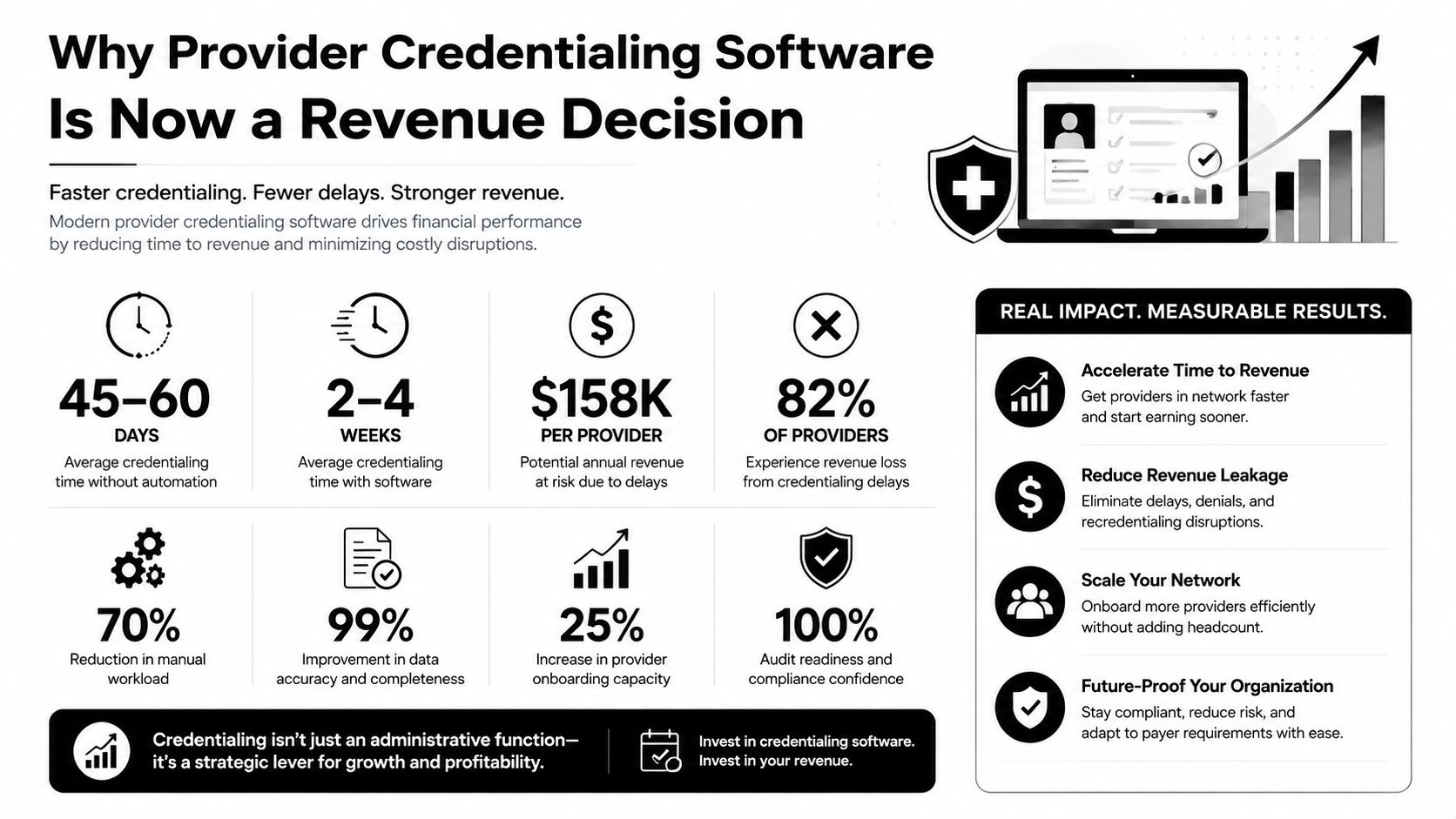
Why Provider Credentialing Software Is Now a Revenue Decision
Credentialing delays do more than frustrate coordinators, they hold back cash. Medwave reports that the average credentialing process takes 90 to 120 days, organizations lose about $7,500 per physician per day because of credentialing delays, and 63% have shortened turnaround times with automated solutions source. Treat this purchase as a revenue decision, because the costs show up in collections, not just in admin workload.
The failure mode in practice is easy to recognize. A physician starts, the internal checklist looks complete, the practice manager assumes payer enrollment is moving, and then claims bounce because enrollment lagged behind credentialing. That gap is where specialty groups lose cash, network status, and negotiating power.
Practical rule: if a vendor only talks about document storage, you're looking at a filing cabinet with a nicer interface.
What matters is whether the system protects billable status from day one and keeps it protected over time. Medwave also says the average cost to credential a single provider runs $200 to $400, automation can cut processing costs by up to 60%, and it can reduce claim denials tied to provider enrollment issues by 30% source. The same source says 76% of organizations still rely on manual processes for at least part of credentialing, while 67% plan to implement or upgrade software within two years source. That is not a software fad. It is a correction happening under revenue pressure.
A practice that ignores credentialing quality ends up paying twice, first in staff time, then in downstream billing friction. That is why credentialing software belongs in the same conversation as medical accounts receivable pressure, payer enrollment, and dispute readiness. If a platform cannot support all three, it leaves money exposed.
What buyers should care about first
Judge these platforms on three things.
- Revenue readiness: Can the software get providers into paid status without gaps between credentialing, enrollment, and directory updates?
- Risk control: Does it maintain a defensible record for audits, recredentialing, and dispute work?
- Operational fit: Will it match how your team works across states, specialties, and payer types?
The right frame is simple. Credentialing software is a control layer that keeps a provider from becoming “active” on paper while still being invisible to payers. That position puts the purchase inside revenue strategy and dispute readiness, where it belongs.
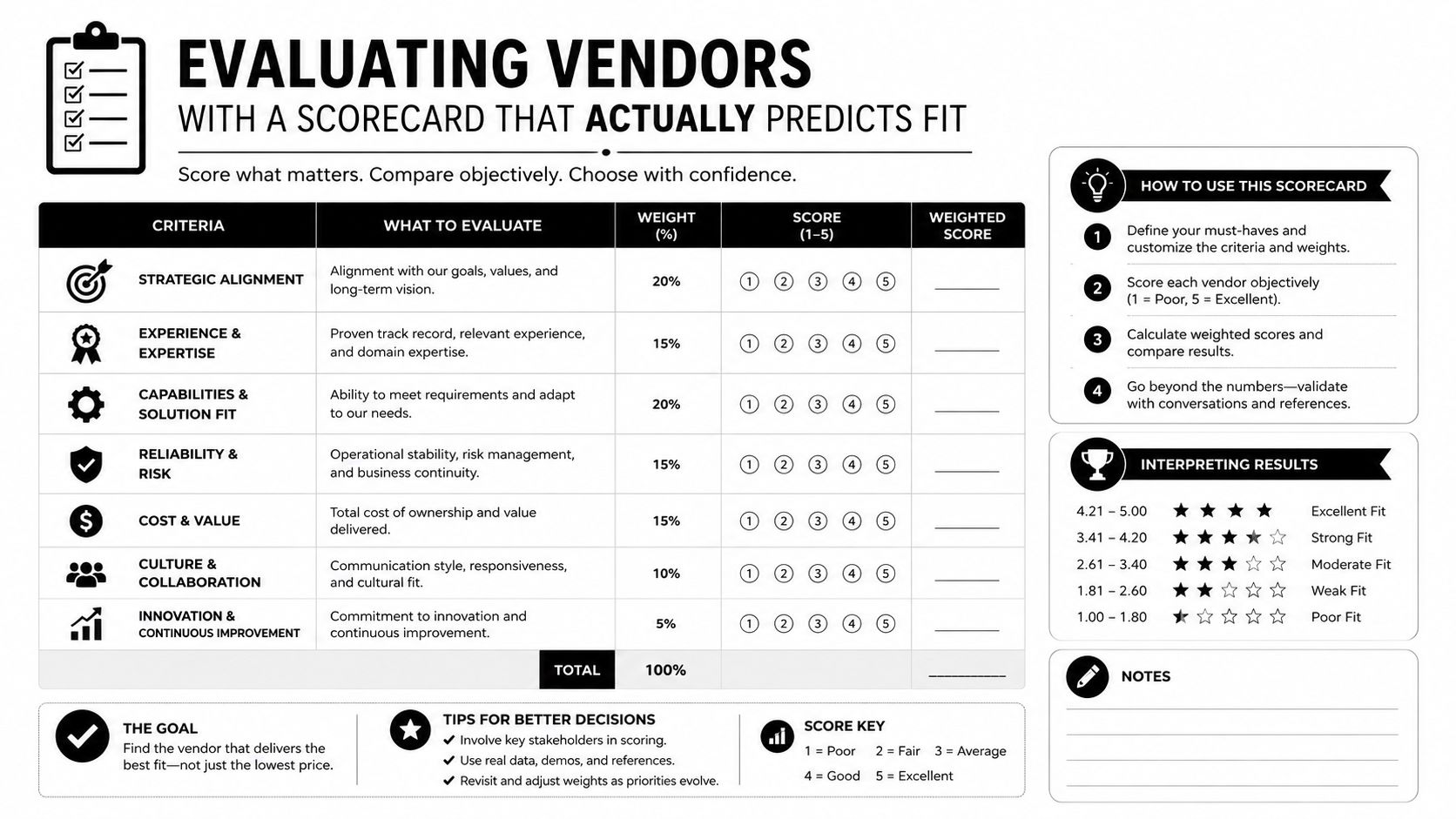
Evaluating Vendors With a Scorecard That Actually Predicts Fit
Most demos look polished. That's the problem. A vendor can show a clean dashboard in ten minutes and still fail the first messy payer cycle, the first multi-state roster cleanup, or the first recredentialing wave. You need a scorecard that tests how the product behaves when real provider data is ugly.
The first thing I'd demand is primary source verification breadth. A serious platform should automate the full PSV chain across state medical boards, NPPES, OIG LEIE, SAM.gov, and DEA registries, then route exceptions to humans instead of making staff click through every lookup. Atlassystems describes that exact model and says one published platform claims it can cut turnaround times by up to 70% versus manual spreadsheet work source. Don't get hung up on the headline. Use it as a standard for how much of the workflow should be machine-run before a coordinator touches it.
Questions that expose weak products fast
Ask these in every demo.
- What sources do you verify automatically, and which ones still depend on manual follow-up?
- How do you handle CAQH synchronization and sanctions monitoring?
- Can you produce timestamped evidence for every verification step?
- What happens when a verifier or upstream registry is down?
- How do document version conflicts get resolved?
- Can the system generate payer-ready packets without extra manual formatting?
The next filter is workflow control. You want role-based routing, not a one-size-fits-all inbox. You also want expirables management with 90/60/30/15-day alerts, because missed expirations are not a minor housekeeping issue, they become enrollment and reimbursement problems. Industry implementation guidance also emphasizes append-only audit logs, encrypted storage, and CAQH and sanctions connectors as baseline architecture, not premium extras source.
Demand this in writing: no vendor should get credit for “automation” if the team still has to babysit alerts, chase every exception, and rebuild packets by hand.
Provider Credentialing Software Vendor Scorecard
| Criterion | Why It Matters | Pass Threshold |
|---|---|---|
| PSV coverage | Cuts manual verification load and reduces missed checks | Automates major primary sources and exceptions are clearly routed |
| CAQH sync | Prevents stale data and re-attestation errors | Syncs reliably and logs change history |
| Expirables alerts | Protects against lapses and avoidable denials | Supports staged reminders and escalation rules |
| Audit log quality | Needed for audits and dispute support | Time-stamped, append-only, searchable |
| Workflow configurability | Lets the software match your team, not the other way around | Role-based routing and payer-specific logic |
| Packet generation | Saves time during enrollment and recredentialing | Can export payer-ready records without rework |
Use that scorecard in procurement, and cut any vendor that treats auditability, role control, or source coverage as optional.
Integration Patterns With RCM, EHR, and Payer Enrollment
A credentialing system that lives by itself is a liability. If it doesn't talk to RCM, the EHR provider master, and enrollment workflows, the data inside it ages quickly and your claims process pays the price. The hidden cost isn't just duplication. It's inconsistency, stale taxonomy, bad directory data, and a provider who is “good to go” in one system while still blocked in another.
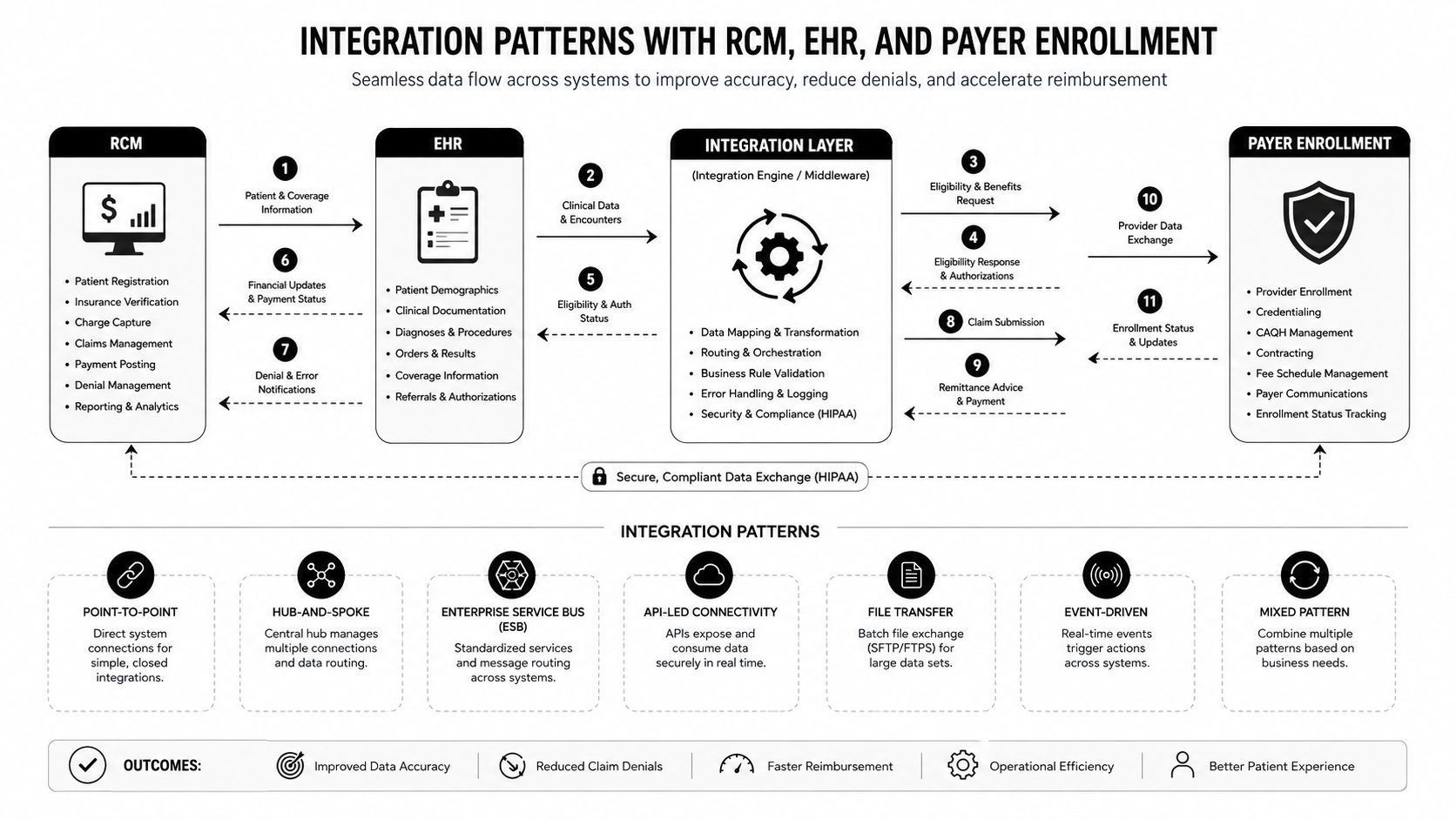
There are three integration patterns I see in the field.
| Pattern | What it looks like | Where it breaks |
|---|---|---|
| Nightly flat-file export | Good enough for smaller groups with limited volume | Data is stale, mismatches linger, and errors show up late |
| API-first stack | Better for growth groups and multi-system operations | Needs disciplined data governance or you just sync bad data faster |
| Managed integration | Vendor or RCM partner runs the plumbing | Easier operationally, but you must watch ownership and support scope |
The best pattern depends on operating complexity, not vendor marketing. A single-specialty practice can sometimes survive with lighter coupling. A multi-state group, ASC network, or PE-backed platform cannot. Once you're juggling multiple payers, directories, and site locations, every disconnected handoff becomes a downstream billing risk.
What to integrate first
Start with the systems that create the most billing exposure.
- EHR provider master: Keep names, taxonomy, locations, and affiliations aligned.
- Payer enrollment workflows: Don't let enrollment sit in a separate inbox with no shared status.
- RCM and claims systems: Ensure billing staff can see whether a provider is active, pending, or blocked.
- Directory and roster outputs: Let status flow outward instead of being manually retyped.
QGenda's guidance on the clearinghouse layer in medical billing matters here because credentialing data doesn't stay trapped in onboarding. It affects whether claims, eligibility, and enrollment records tell the same story. When those systems diverge, billing teams spend their time reconciling facts instead of collecting cash.
The warning signs are obvious once you know where to look. Duplicate provider records mean your master data isn't controlled. Stale taxonomy codes mean enrollment and claims may be pointing at different provider identities. Directory entries that lag by weeks mean your network status is already outdated by the time patients and payers see it.
If the vendor can't explain how a provider record becomes consistent across credentialing, enrollment, and billing, the integration isn't real yet.
Compliance and the No Surprises Act Connection
A payer dispute changes the value of credentialing files the moment it moves into Independent Dispute Resolution under the No Surprises Act. At that point, the file is evidence. Credentialing software has to do more than store approvals. It has to produce records that hold up when the billing team needs to prove status, timing, and network participation.
The compliance standard is clear. Use a HIPAA-eligible cloud stack, keep an append-only audit log, and retain the actual evidence trail, not just the final approved packet. The architecture should separate the front end, backend services, encrypted storage, and audit logging, with CAQH integration and sanctions monitoring as core connectors. That matters because arbitration does not care about a polished summary screen. It cares about what was verified, when it was verified, and who touched it.
The file has to show the full chain of proof. If the vendor cannot preserve source documents, status changes, and reviewer actions in a way that stands up later, the software is creating risk, not reducing it. Multi-state groups feel this first, because a single weak record can affect claims, enrollment, and dispute readiness across several contracts at once. For a plain-language overview of the law, use this No Surprises Act summary.
What belongs in the evidence trail
Tie these items to the provider record and the status timeline.
- Primary source verification artifacts: License, board, sanctions, and registry checks.
- Network participation dates: When the provider became effective, not when someone signed off internally.
- Board certification and training records: Anything that supports the provider's status in a dispute.
- Audit history: Who edited what, when, and why.
The common failure is mixing self-attested data with verified data and treating the result as defensible. It is not. Once sanctions monitoring or expirables tracking goes stale, the file stops acting like a source of truth and starts acting like a liability. Vendors should show exactly how verified data is locked, how exceptions are flagged, and how stale records are surfaced before they reach billing or dispute review.
Compliance rule: if it can matter in arbitration, it needs a timestamp, a source, and a history of changes.
Credentialing software should make it easy to prove the provider was properly enrolled, properly monitored, and properly documented at the time of service. That is the standard to demand from vendors. If they cannot show that chain cleanly, the platform is not built for reimbursement work under the No Surprises Act.
Data Migration and the Phased Rollout That Prevents Disasters
Most failed implementations do not break because the software cannot handle credentialing. They break because the source data is a mess. Duplicate provider names, mismatched NPIs, missing licenses, and stale payer statuses will turn a good platform into a more expensive version of the spreadsheet problem.
The rollout has to begin with provider master cleanup and deduplication. Clean the master record first, then configure role-based workflows, run parallel systems during the transition, and validate expiration alerts before old tracking tools are turned off. That sequence forces truth before automation. Skip it, and bad data just moves faster.
A Phased Plan for Success
- Clean the source file. Fix duplicates, fill in missing fields, and standardize naming conventions.
- Map legacy fields carefully. Do not let old spreadsheet habits define the new schema.
- Test the workflows with a small provider group. Choose a messy cohort, not a perfect one.
- Run parallel systems. Keep the old tracker active long enough to catch mismatches.
- Validate expiration alerts. Watch at least one cycle before shutting the old method off.
- Audit exception handling. Make sure only true edge cases go to human review.
- Decommission legacy tools last. Do not retire them before the team trusts the new record.
Some data deserves extra scrutiny because it can break reimbursement the moment it is wrong. Out-of-state licenses, hospital privileges, malpractice coverage details, and historical sanctions records usually carry the most mistakes because teams recorded them inconsistently for years. Specialty groups with multiple sites or multiple states feel that pain first.
Field lesson: if the vendor wants to import your spreadsheets before cleaning them, stop the project and clean first.
The other failure modes are predictable. Poor data hygiene, workflow mismatch, weak change management, and heavy reliance on vendor templates will wipe out the value of the platform. Credentialing coordinators need to see their real work reflected in the system, not a fantasy process built by someone who has never chased a payer portal at 4:45 p.m.
Operational Roles, KPIs, and Proving ROI
ROI comes from the people running the workflow. If no one owns intake, verification, exceptions, and follow-up, the platform turns into a cleaner place to park unresolved work.
Start with the role map. Credentialing coordinators own intake and verification. Payer enrollment specialists own submission, follow-up, and status tracking. RCM leadership owns the cash impact. Compliance owns monitoring, audit readiness, and documentation quality. Operations has to step in when the workflow breaks, because it will.
A specialty group that assigns those duties to one team usually creates bottlenecks. A group that splits ownership cleanly gets faster provider activation, cleaner handoffs, and fewer excuses when a payer challenges the file.
The KPIs that matter
Measure the numbers that show whether providers are becoming billable on time and whether the record can survive a dispute.
- Time to credential: How long it takes from initiation to verified completion.
- Time to enrollment: How long it takes to get the provider into payer systems.
- First-pass payer approval rate: How often submissions clear without back-and-forth.
- Expirables compliance rate: How consistently the team catches renewals on time.
- Credentialing-driven denial rate: How often credentialing issues show up in remittance problems.
- Dispute-ready record completeness: Whether the file can support payer challenges later.
Finance will not care about process purity. Finance cares about avoidable denials, fewer rework cycles, and shorter delay windows between hire date and billable status. Use those outcomes to frame the case, because that is the part that survives budget review and payer pressure.
The pricing discussion deserves the same rigor. Recent guidance says smaller organizations often pay about $15 to $50 per provider per month, while some vendors cite $5 to $25 per provider per month, but that sticker price leaves out hidden labor, payer-enrollment delays, data cleanup, and support gaps at scale source. Cheap software often turns expensive once the team starts cleaning files, chasing statuses, and fixing workflow gaps the vendor never disclosed.
Demand proof before you sign. Ask the vendor to show how the system shortens billable time, reduces denials tied to credentialing errors, and surfaces exceptions fast enough for a coordinator to act before revenue slips. If they cannot connect the tool to a KPI and a named owner, they are selling storage, not ROI.
ROI rule: buy a credentialing platform only if you can name the KPI it will move and the person responsible for moving it.
Common Pitfalls and a 30-Day Action Plan
A 40-provider specialty group I saw made the classic mistake. They bought a feature-rich platform, skipped cleanup, loaded in messy records, and then wondered why they had duplicate providers, missed expirations, and a denial problem before the software ever settled in. The product wasn't the only problem. The process was.
The usual mistakes are boring, which is why they keep happening. Teams chase features instead of fit. They underestimate payer enrollment timelines. They ignore parallel workflows between credentialing and privileging. They treat the software as a standalone purchase instead of a node in the RCM system.
The next 30 days should be very simple.
- Define your scorecard. Use the criteria that matter to revenue and compliance.
- Shortlist three vendors. No more.
- Run a paid pilot with one provider cohort. Test real data, not demo data.
- Baseline the KPIs. Measure current delays, denials, and rework.
- Map the IDR evidence trail. Know what records you'll need before a dispute happens.
- Decide who owns enrollment and exceptions. Ambiguity kills adoption.
The goal is not to buy software. The goal is to stop credentialing from becoming a downstream billing problem.
If you want a credentialing workflow that's built to protect revenue, not just store documents, RevGuard can help connect credentialing, payer enrollment, and dispute readiness into one operating model. Visit RevGuard to see how its RCM and IDR approach fits specialty groups that need cleaner records, fewer denials, and stronger recovery when payers underpay.